
ChatGPT plugin
Coloring pages right inside ChatGPT
Add My Coloring Pages to ChatGPT, ask for coloring pages on any theme, and a gallery of ready-to-print pages appears in the chat.
Pick the one you like and ChatGPT emails it to you as a printable PDF.
Free to use. No My Coloring Pages account needed.
Make your own coloring pagesWant a page starring your child? Your first custom page is free, no card needed.


Type any subject · print-ready in seconds
Why use it instead of asking ChatGPT to draw
Ready-made pages that were made for printing.
Print-ready, every time
Every page is clean black-and-white line art with open spaces, reviewed before it joins the library.
Instant gallery
See a whole set of matching pages at once instead of waiting for one drawing at a time.
Whole collections
Each page belongs to a themed collection, so one search opens dozens more pages on the same theme.
No licensed characters
Original artwork only, so pages are safe to print for a classroom, a party or home.
How to add it to ChatGPT
It takes about 2 minutes, and you only do it once.
- A computer (not the phone app)
- A paid ChatGPT plan, like Plus
- No My Coloring Pages account
- 1
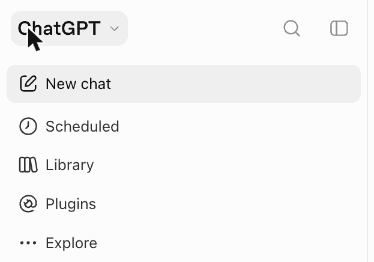
Open Plugins in ChatGPT
Go to chatgpt.com on your computer and sign in. In the menu on the left, click Plugins.
Don't see the menu? Click the small square icon in the top-left corner to open it.
- 2
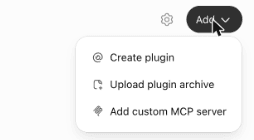
Click Add, then Add custom MCP server
In the top-right corner, click Add. A small menu opens. Click Add custom MCP server.
- 3
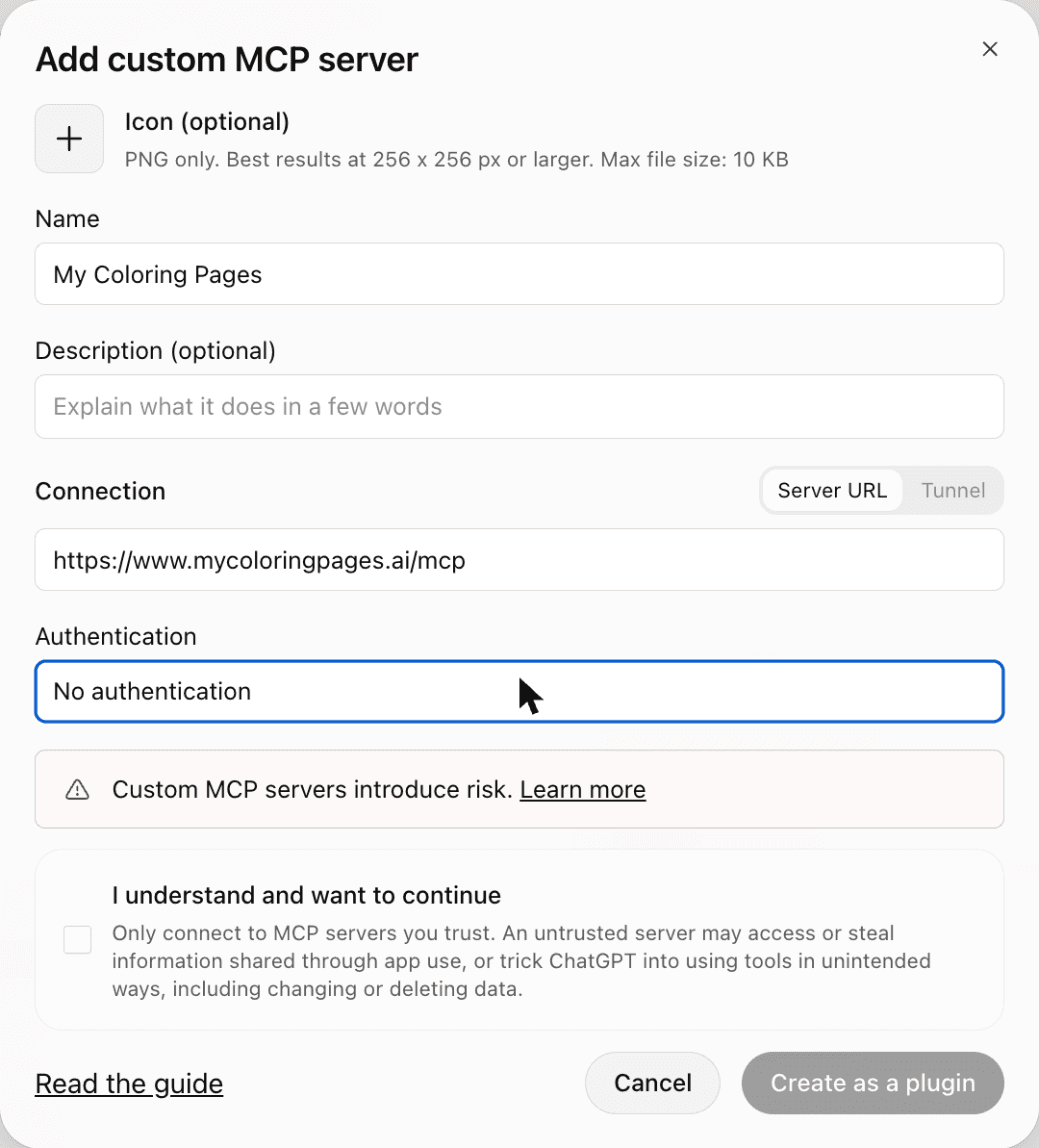
Fill in the form
Type My Coloring Pages in the Name box. Copy our address and paste it into the box under Connection:
https://www.mycoloringpages.ai/mcpNext, find Authentication. It says OAuth at first: click it and choose No authentication.
Tick I understand and want to continue, then click Create as a plugin.
ChatGPT shows this warning for every plugin added by hand. Ours only searches our coloring page library and sends the pages you ask for.
- 4
Ask for coloring pages
Click the button to open ChatGPT with the message already typed in, then press send.
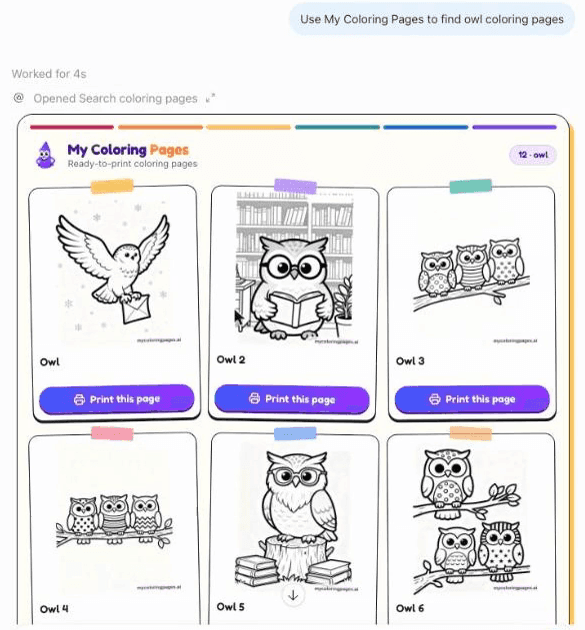
Or start a new chat and type: Use My Coloring Pages to find owl coloring pages
A gallery of pages appears right in the chat.
- 5
Print the one you like
Click Print this page under any page. ChatGPT asks which email address to send it to: type your email and send.
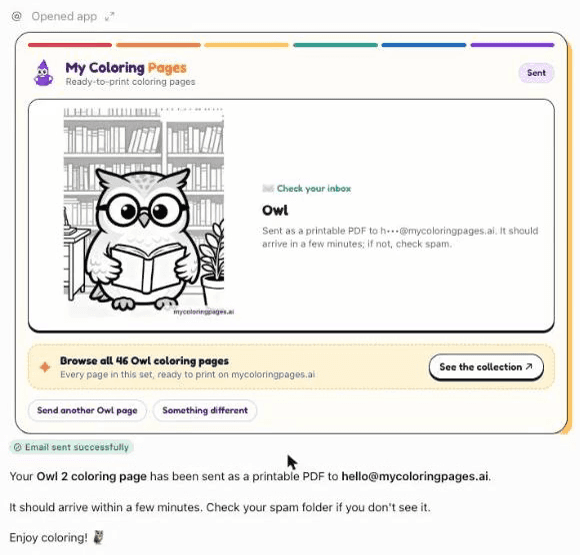
ChatGPT asks once more before it sends anything. Click Allow once. The page arrives in your inbox as a PDF within a few minutes, ready to print.
Try asking
Open one straight in a new chat, or copy it and paste it in yourself.
Use My Coloring Pages to find Halloween coloring pages for my preschool class
Use My Coloring Pages to find unicorn coloring pages for a birthday party
Use My Coloring Pages to find farm animal coloring pages
Use My Coloring Pages to find dinosaur coloring pages
Not working?
I don't see Plugins or Add custom MCP server
The Create as a plugin button stays grey
ChatGPT answers without showing any pages
The email didn't arrive
Still stuck? Email hello@mycoloringpages.ai and we'll help you set it up.
What parents and teachers ask it for
A few of the requests it handles well.
A rainy afternoon
Ask for a favourite animal or theme and print a stack in a minute.
Classroom themes
Seasons, holidays and topics for a whole class, ready for the photocopier.
Birthday parties
Theme pages to match the party, printed for every guest.
Holidays
Halloween, Christmas, Easter, Thanksgiving and more, whenever the date comes round.
Calm time
Simple pages for younger children who need a quiet activity.
Sunday school
Pages on Bible stories and themes for a lesson or a craft table.
What families say about the pages
“The quality is outstanding! Clean lines, thoughtful designs, and they print beautifully.”
“My 7-year-old daughter absolutely loves the princess designs! The lines are just the right thickness for her age.”
“As an art teacher, I use these to supplement my curriculum. The line quality is clean enough to practice shading.”
Questions about the ChatGPT plugin
Is it free to use in ChatGPT?
Yes. Searching, previewing and getting pages by email are all free.
Do I need a My Coloring Pages account?
No. The plugin works without signing in.
How do I print a page?
Click Print this page under the one you like. ChatGPT asks which email address to use, then sends the page to you as a PDF you can print from any phone or computer.
Why not just ask ChatGPT to draw a coloring page?
You can, but drawn pages often come out shaded, cluttered or too detailed to color. Our pages are ready-made line art built for printing, and you see a whole set at once.
Does it include cartoon characters?
No. Every page is original artwork with no licensed or trademarked characters.
What does the plugin see from my chat?
Only what ChatGPT sends to it: your search terms, the page you choose, and an email address if you ask for a page to be emailed. See section 3a of our privacy policy.
Find your first page in ChatGPT
Set it up once, ask for a theme, and print.
Make your own coloring pages